
SciMed Education
Automated Crude Oil Distillation with the VD10
In Summary
Crude oil is often distilled at atmospheric pressure to prepare samples for test methods such as ASTM D4929 (organic chloride content) and ASTM D6560/IP143 (asphaltene determination). Unlike more refined petroleum products, unprocessed crude can contain dissolved gases and water that make it foam and bump in the distillation flask, which risks the sample overflowing into the condenser.
The VD10 distillation unit solves these issues by using a camera‑assisted control (CAM Control) mode that gently heats the sample while monitoring and adjusting the power to maintain a steady 2 mL per minute distillation rate. This automated approach allows laboratory staff to perform crude‑oil distillations safely and consistently, ending the test at a preset temperature, volume or temperature drop without constant supervision.
Why is crude oil distillation at atmospheric pressure challenging?
Distilling crude oil at atmospheric pressure is more difficult than distilling processed fuels because the raw material often contains traces of water and dissolved gases that cause strong foaming, bumping and unpredictable boiling behaviour. As the vapor rises in the neck, the contents can overflow into the condenser tube if heating is applied too quickly.
For this reason ASTM methods such as D4929 and D6560 require laboratories to prepare crude samples by distillation, yet conventional automated distillation units still rely on an operator to monitor the boiling behaviour and stop the test if the sample rises too high. Gentle heating and close observation are therefore essential when using traditional equipment.
How does the VD10 and its CAM Control mode automate crude oil distillation?
The VD10 distillation unit addresses the foaming and bumping issues inherent in crude oil by incorporating a CAM Control mode. This special testing mode uses the VD10’s built‑in digital camera to observe the boiling behaviour and gradually increase the heating power while keeping the distillation rate as close as possible to 2 mL per minute.
If excessive foaming is detected, the instrument automatically reduces the heating power to prevent the sample from building up in the neck and overflowing. Because the instrument continuously adjusts the heating profile, the distillation may take longer than a standard ASTM D86 run.
But it ensures smooth distillation up to a predetermined end point, such as a target temperature, a collected volume or a specified temperature drop. This automation allows crude oil distillations to be completed without constant operator intervention.
How do you configure a PreSet for crude oil distillation using ASTM D86 on the VD10?
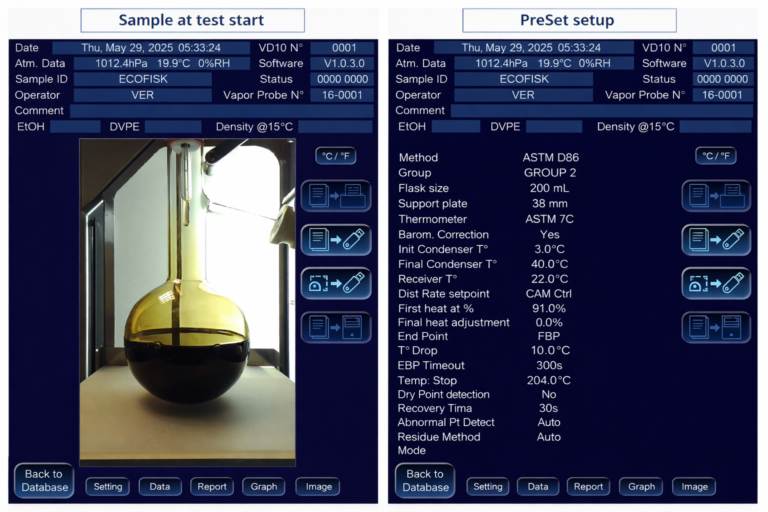
Activating CAM Control on the VD10 requires creating a new PreSet based on the ASTM D86 distillation method. To do this, open the VD10’s Settings menu, select “Preset Settings” and press “New Preset.”
Give the preset a descriptive name, such as “Crude_Stop_204,” and choose ASTM D86 as the base method. The method’s group (2 or 4) should be selected according to how light or heavy the crude oil is. Because crude oils have a wide boiling range and may contain paraffins, it is often necessary to ramp the condenser temperature; therefore, enter suitable initial and final condenser temperatures in the preset settings.
For crude oil tests the “Distillation rate setpoint” must be set to “CAM Ctrl” by entering “99,” which enables the camera‑assisted control mode. If strong foaming is expected, SciMed recommends using a 200 mL flask and a vapour‑probe centering device. Set the desired end condition (temperature, volume or temperature drop) and remember to save the preset so it can be recalled for future runs.
What is the proper sample‑loading procedure for crude oil in the VD10?
Before distillation, crude oil should be thoroughly homogenised according to the relevant ASTM method so that any waxes, sediments or separate phases are evenly distributed.
Using a long‑stem funnel, pipette or syringe with an extension tube, transfer 100 mL of the homogenised crude to the distillation flask by injecting the sample to the bottom of the flask to minimise contact with the neck. Avoid letting the sample stick to the glass near the neck, as this can contribute to uneven boiling and foaming.
Place a clean, empty receiver in the receiver chamber and insert the filled flask into the holder above the heating plate. Select the corresponding pre‑programmed preset, enter the sample ID and press “START” – the test will then run automatically under CAM Control.
When is CAM Control not required for crude oil distillation in ASTM D86 testing?
If the crude oil sample does not exhibit excessive foaming, it can sometimes be analysed as an ordinary petroleum product using the standard ASTM D86 group 2 or group 4 settings without CAM Control. In these cases the operator can follow the normal operating procedures outlined in the VD10 operation manual and skip the CAM‑specific PreSet.
However, because crude oils can behave unpredictably, users should always monitor the first run to verify that foaming remains minimal before deciding to omit CAM Control on subsequent analyses.
Why should boiling chips be avoided in crude oil distillation during ASTM D86 testing?
Boiling chips are commonly used to promote smooth boiling in distilled products, but they should not be used when distilling crude oil with the VD10.
Adding boiling chips may increase the risk of excessive foaming. Because the CAM Control mode already manages boiling behaviour by adjusting the heating power, additional nucleation sites are unnecessary and may destabilise the distillation.
'Automated crude oil distillation at atmospheric pressure using CAM Control ensures
safe, controlled boiling behaviour for reliable ASTM-based sample preparation'
What end‑point conditions should you set for crude oil distillation?
When configuring a crude oil PreSet, choose an end‑point condition appropriate for the analysis. For example, ASTM D4929 preparation of a naphtha fraction requires collecting up to a cut point of 204 °C (400 °F), so the preset might be named “Crude_Stop_204”. Alternatively, for a full crude‑oil distillation the user might programme the instrument to stop at a specified final boiling point or to halt the test when the temperature drops by 10 °C, which prevents interruptions caused by temporary temperature fluctuations. Whatever criterion is chosen, the CAM Control mode will carry out the distillation automatically until the preset end condition is met.
What to do Next?
Speak to our specialists to optimise your crude oil distillation workflows and ensure accurate, reliable ASTM D86 testing
Page FAQ's
The VD10 uses a camera‑assisted control mode for crude oil distillation, and the distillation‑rate setpoint must be set to “CAM Ctrl” by entering the value 99 in the preset. This allows the instrument to automatically maintain a target rate of approximately 2 mL per minute while preventing foaming.
The standard sample volume is 100 mL, loaded with a long‑stem funnel, pipette or syringe to the bottom of the flask. If strong foaming is anticipated, use a 200 mL flask and a vapour‑probe centering device to provide more headspace and reduce the likelihood of overflow.
The crude oil must be thoroughly homogenised according to the applicable ASTM method before a 100 mL aliquot is taken for distillation. Homogenisation ensures that any insoluble components or separate phases are evenly distributed and prevents inconsistent boiling behaviour.
Because crude oils have a wide boiling range and may foam excessively, a customised PreSet is needed to enable CAM Control, ramp the condenser temperature and set appropriate end‑point conditions. Creating a PreSet based on ASTM D86 ensures that the instrument follows the correct method group and uses the camera to adjust heating automatically.
Yes. If a particular crude oil does not demonstrate excessive foaming, it can be distilled like an ordinary petroleum product using group 2 or group 4 settings without CAM Control. However, this should only be done after confirming that the sample behaves smoothly; otherwise CAM Control should remain enabled.
Contact Us Today
We take great pleasure in assisting you and ensuring you get a prompt response to your questions
Live chat opening hours Mon – Fri 9:15 to 16:30 (UK Time)